Bring equipment into space.
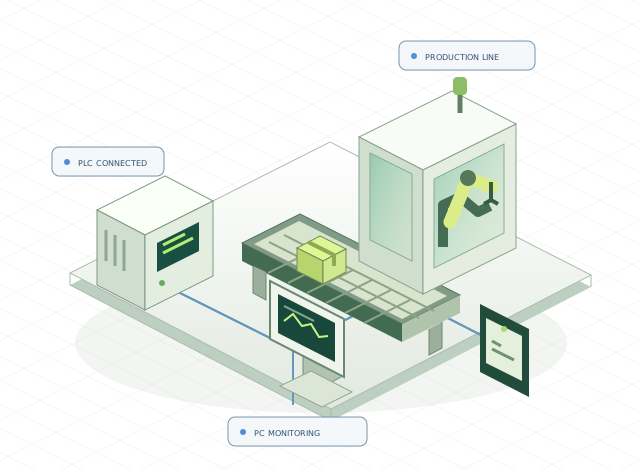
Equipment geometry and process layout are built as a 3D model, showing the context of the site.
BEYOND THE SCREEN. INTO YOUR FACTORY.
PLCs, robots, measuring instruments and any device that communicates.
We connect equipment to the PC for control and monitor it in 2D and 3D.
Software that understands the shop floor. SOLACODE.
01 / A NEW DIMENSION OF MONITORING
Robot motion, instrument readings and the exact location of a fault.
We build monitoring software that links equipment data to 3D models.
 SOLA SPATIAL/ INTERACTIVE SHOWCASE
Virtual PLC signal received · all equipment running (example)
Equipment geometry and process layout are built as a 3D model, showing the context of the site.
Run/stop signals are linked to robot and transfer motion so equipment behavior is intuitive.
Equipment selection, alarm location, process data and cycle time come together on one screen.
The layout, models and motion in this demo were newly created for this website. No customer model, screen or PLC address is used, and no equipment connection or control command is executed. Actual integration scope and motion accuracy are agreed per project.
02 / WHAT WE BUILD
Every machine has its own signals and workflow.
We understand the language of the floor and turn it into screens that are easy to use.
We connect PLCs, robots, measuring instruments, sensors and other devices to the PC, implementing data acquisition and control commands for each device protocol.
Check and control the status and measurements of many devices on one 2D/3D screen. Run commands, setpoint changes, results and alarms are tailored to your site.
Keep measurement history and deliver notifications when they matter. From data collection to lookup, we support daily operation.
03 / TRACK RECORD
Selected development work since our founding in December 2024.
To protect our customers, company names, product names and real screens are not disclosed.
Receives signals from six equipment PLCs and shows operating status, alarm history and per-process cycle time on a 3D line model.
Collects 16 channels of EtherCAT load data together with PLC position values, displays them as real-time graphs across four monitors, and queries stored history by time range.
Integrates three displacement sensor controllers (10 channels) with a PLC to measure and judge each product, recording results to the PLC and a database.
Controls withstand-voltage, leakage-current and power instruments in barcode input order, manages final judgment and NG rework, and includes a production and Andon dashboard.
Shows per-station measurements and statistics in real time with judgment against product specifications and consecutive-NG alarms. Development is complete and on-site installation is pending.
Analyzed the source of an existing program in operation, separated it by function, and fixed PLC communication timeout, reconnection and shutdown issues.
Integrates PLC, vision inspection, barcode, label printer and power supply in one program to manage per-station inspection results and unified history.
Displays measurements as a real-time trace and sends OK/NG results to the PLC. Includes measurement history lookup and performance improvements for long-running operation.
Collects and judges fastening, leak and dimension inspection results from PLCs on assembly lines, with barcode-based history lookup and Excel reports. A single unified codebase is being rolled out to similar lines, expanding toward plant-wide management.
Judges measurement data from sensors in real time, sends results to the PLC, and stores and retrieves inspection history and measurement images. Still being improved today.
Receives equipment data over Ethernet to store temperature history, with recipe management, trend graphs and Excel export.
Collects process temperature and pressure data from a PLC, displays it as graphs and prints process records.
Periods are based on development and improvement work. Our own products, SOLA PC and the SOLA Noti app, have been developed and distributed since January 2026.
04 / EXPERIENCE THE CONNECTION
Choose a scenario and watch what changes.
An example of a monitoring screen we can develop for your site.
SOLA / FACTORY VIEWTo protect customer security, we use self-made samples instead of real project screens. Values and states are virtual; no real equipment control or notification occurs.
05 / FREE TO CONNECT
Experience SOLACODE technology yourself.
SOLA PC and the SOLA Noti app are free to use.
Reads equipment signals and
tells you when it matters.
Windows 10 22H2 or later · Windows 11 / x64
For reading, monitoring and notifications only; PLC write control is not provided.
Important alerts from the floor,
right in your hand.
SOLA Noti ◷Equipment temperature is above the limit.
Please check the site.
Free on Android and iPhone
The app is for receiving alerts; remote equipment control is not provided.
06 / THE PEOPLE BEHIND THE CODE
Between complex equipment and people,
SOLACODE connects them with software.
SOLACODE is a smart factory and industrial automation software company founded in December 2024. We implement control and monitoring for PLCs, robots, measuring instruments and other communicating devices to fit each site, bringing the status and measurement data of different equipment into a single PC program.
From starting a new project to improving an existing system.
We build while looking closely at the functions you need and the real operating environment.
HOW WE WORK
We listen to your equipment setup, communication methods and current pain points.
We define the screens, functions and scope of development.
We verify communication and behavior and refine the workflow.
We confirm in the target environment and guide you through its use.
GOOD TO KNOW
Device communication for PLCs, robots and instruments, new PC control and monitoring programs, feature improvements to existing programs, source analysis and migration. Tell us your equipment models, current environment and the functions you want, and we will review the scope together.
Yes. Beyond PLCs and robots, we develop custom programs that connect instruments, sensors, inspection equipment and other devices to the PC. Data acquisition, real-time monitoring, setpoint changes and control commands are implemented according to what each device supports. Send us the device model and communication manual and we will review protocol support and scope.
SOLA PC, the SOLA Noti app and the connected notification service are free for individuals and companies. You can download, sign up and start without a contract or administrator approval. Custom on-site development is agreed separately.
The free SOLA is for reading data, monitoring, storing history and notifications. It does not write values to a PLC or start/stop equipment from a phone. For projects that need control functions, please ask about custom development.
The free SOLA supports LS XGT, Mitsubishi MC and Modbus TCP/RTU. Actual connectivity depends on the CPU, communication module and site settings. Please check the manual and your device's supported protocols before installing.
They are samples we made ourselves so that customer screens and data are not disclosed. All values, equipment and alerts shown are virtual and are not real operating results or customer data.
LET’S BUILD YOUR NEXT CONNECTION
You don't need a detailed specification.
Start by telling us what is inconvenient today and what you want to build.